Every card page in Creddy lists the credits on that card. Each credit shows what it is worth and how much of it you have used.
The steps below use the American Express Platinum. Any card in your wallet works the same way.
See the benefits on a card
At the top of the card page you see what you have captured so far, the annual fee and the renewal date. That shows what the card has paid back.
On the web, the page also has Per-use credits and spend milestones. Per-use credits have no yearly limit, and the page shows what you have logged this year. A spend milestone is a reward you earn by reaching a spend amount, like a 200 dollar airline fee credit at 15,000 dollars.
Step 1: On the web, open the Cards tab and click your card. On iPhone, open the My Cards tab, tap the search bar, type the card name and tap your card in the results.
Step 2: Check the top of the page. On the web it shows what you have captured, the annual fee and the renewal date. On iPhone, scroll down to Benefits captured.
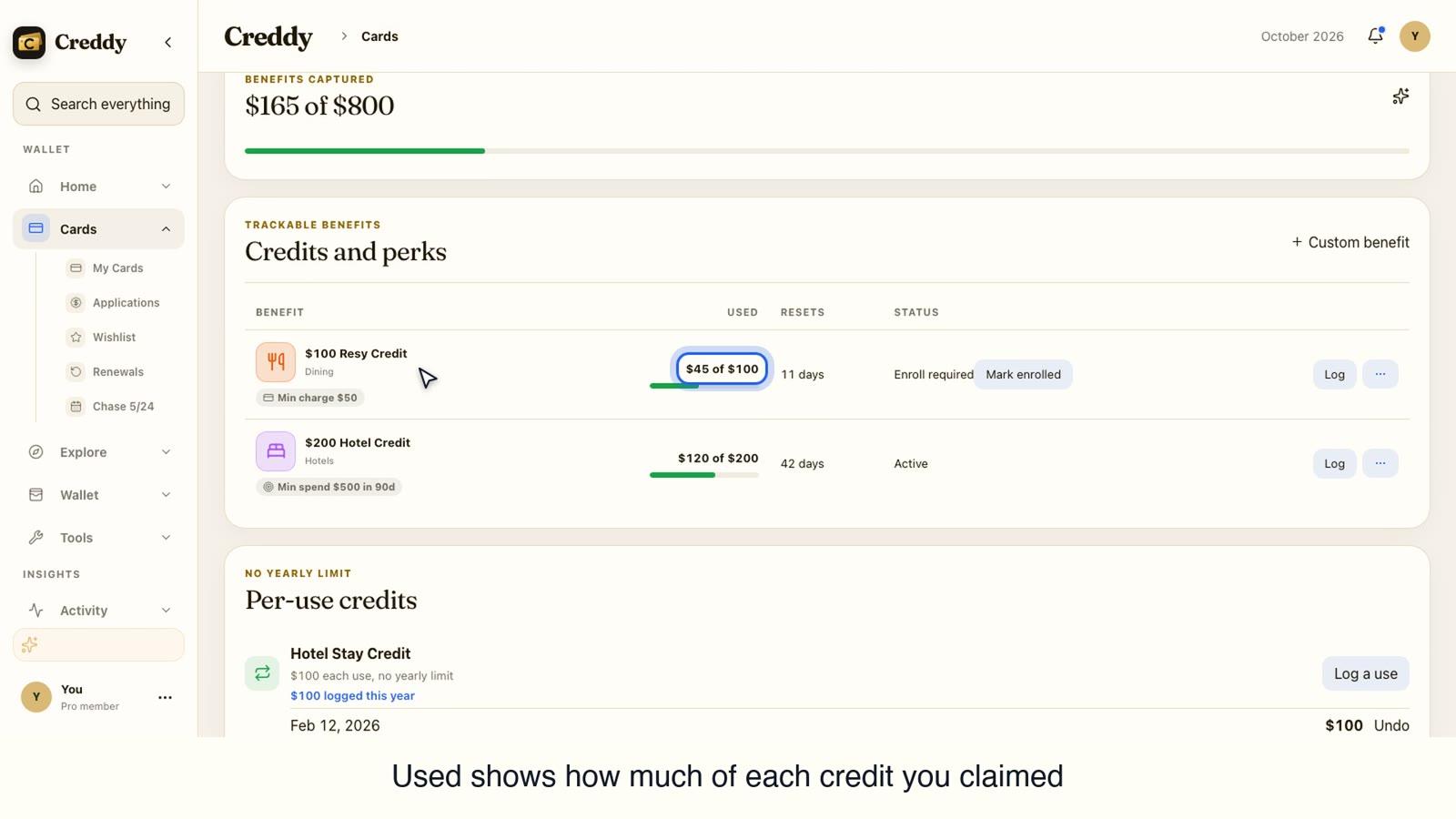
Step 3: Scroll to Trackable benefits. Every credit is listed with its name, what you have used and when it resets.
Step 4: Read the amount in each credit's name. That is what the credit is worth. Used shows how much of it you have claimed, like $45 of $100.
Step 5: Look at Benefits captured to see the total, for example $165 of $800 on the demo card.
Step 6: On iPhone, tap the info button next to a credit to read what it covers, how often it resets and whether you need to enroll.
Video transcript
How to see every benefit on your card, and what each one is worth.
Open the Cards tab and click the card you want to look at. Here we use the American Express Platinum.
At the top you see what you have captured so far, the annual fee and the renewal date, so you know what the card has paid back.
Scroll to Trackable benefits. Every credit on the card is listed with its name, what you have used, when it resets and its status.
The amount in each name is what the credit is worth. Used shows how much of it you have claimed, like 45 dollars of 100.
Benefits captured adds it all up, so you can see how much of the card's value you have used.
Credits you can use as often as you like, with no yearly limit, are listed under Per-use credits, with what you have logged this year.
Spend milestones sit higher up. They show rewards you earn by reaching a spend amount, like the 200 dollar airline fee credit at 15,000 dollars.
That is it. Open any card to see all its benefits, what each is worth and how much you have used.
Find more guides at get creddy dot com.
Video transcript
How to see every benefit on your card, and what each one is worth.
Open the My Cards tab and tap the search bar. Type the name of the card you want to look at. Here we use the American Express Platinum.
Tap your card in the results to open it. Cards in your collection are listed first.
Scroll down. Benefits captured shows how much of the card's value you have used so far, so you know what it has paid back.
Under Trackable benefits, every credit on the card is listed with its name, what you have used, when it resets and how much is left to claim.
The amount in each name is what the credit is worth. Used shows how much of it you have claimed, like 80 dollars of 200.
Tap the info button next to a credit to read what it covers, how often it resets and whether you need to enroll.
That is it. Open any card to see all its benefits, what each is worth and how much you have used.
Find more guides at get creddy dot com.
Why this matters
A card can carry a long list of credits, and each one expires on its own schedule. With the whole list and its values in one place, you can tell which credits are worth your time and which you have already claimed.