The first time you sign in, Creddy opens guided setup on its own. It takes about two minutes and ends with your cards in your wallet.
Nothing in setup is required beyond picking your cards. Dates, last four digits, vouchers and points programs can all wait until later.
Set up your wallet
The web dashboard and the iPhone app follow the same path. You can also open guided setup again later from Home on the web.
On iPhone, setup opens with a few quick questions about your goal, how many cards you carry and what they cost a year. Tap an answer to move on.
Step 1: On the web, click Set up my wallet. On iPhone, tap Get started and answer the quick questions.
Step 2: Open the card list: click Add more cards on the web, or tap Build my wallet and then Add your cards on iPhone.
Step 3: Search for your card by name or issuer and tap every card you have. Each one gets a check mark.
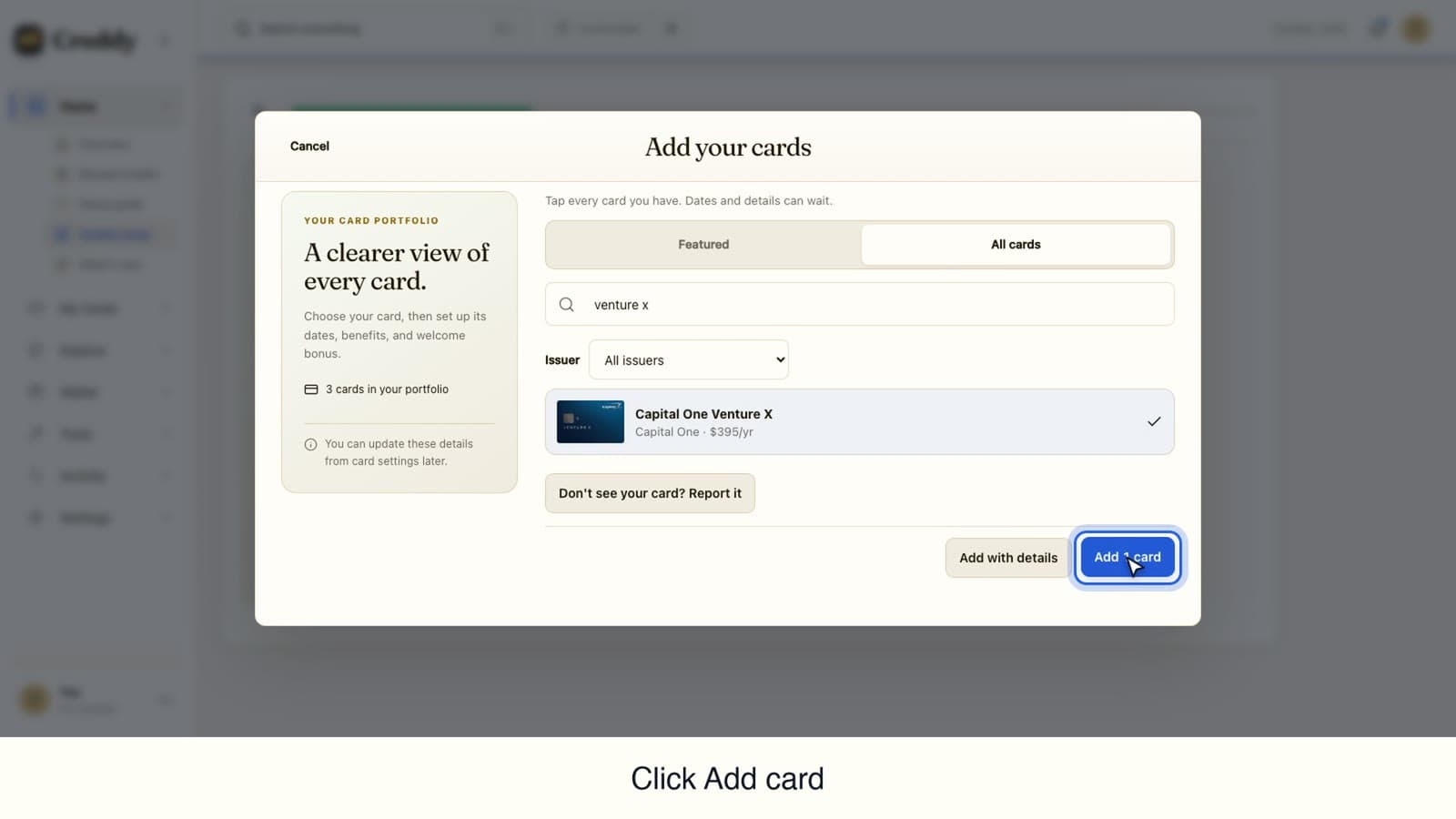
Step 4: Click or tap Add 1 card (the number matches how many you picked).
Step 5: Add the opened date and the last four digits now, or choose Skip for now. You can finish them later from each card.
Step 6: Click or tap Continue. Then add the travel vouchers and points programs you use, or skip that step.
Step 7: Choose your reminders: Enable email reminders on the web, or Enable notifications on iPhone. You can also tap Not now on iPhone.
Video transcript
How to set up Creddy for the first time. Guided setup takes about two minutes.
The first time you sign in, Creddy opens guided setup on its own. You can also open it later from Home. Click Set up my wallet.
Step one is your cards. Click Add more cards to open the card list.
Search for your card by name or issuer. We will look for the Capital One Venture X.
Tap every card you have. Each one gets a check mark.
Click Add 1 card. Dates and details can wait.
Add the opened date and the last four digits now, or choose Skip for now. You can finish them later from each card.
Your wallet now shows every card. Click Continue.
Next, add the travel vouchers and points programs you use. This step is optional, so you can skip it.
Last, turn on email reminders. Creddy writes only when a credit, a welcome bonus or a renewal needs you.
That is it. Your cards are in your wallet and Creddy is ready to track their credits.
Find more guides at get creddy dot com.
Video transcript
How to set up Creddy for the first time. Guided setup takes about two minutes.
The first time you open Creddy, guided setup starts on its own. Tap Get started.
A few quick questions shape the app around you: your goal, how many cards you carry and what they cost a year. Tap an answer to move on.
Step one is your cards. Tap Build my wallet, then Add your cards to open the card list.
Search for your card by name or issuer. We will look for the Capital One Venture X.
Tap every card you have. Each one gets a check mark.
Tap Add 1 card. Dates and details can wait.
Add the opened date and the last four digits now, or choose Skip for now. You can finish them later from each card.
Your wallet now shows your card. Tap Continue to see what its credits are worth.
Next, add the travel vouchers and points programs you use. This step is optional, so you can skip it.
Last, choose reminders. Creddy writes only when a credit, a welcome bonus or a renewal needs you. Tap Enable notifications, or Not now.
That is it. Your card is in your wallet and Creddy is ready to track its credits.
Find more guides at get creddy dot com.
Why this matters
Once your cards are in the wallet, Creddy can show what each one offers and remind you before a credit runs out. Creddy writes only when a credit, a welcome bonus or a renewal needs you.